

As the worlds of sales and marketing automation continue to converge, one issue is the confusion caused by salespeople and marketers traditionally using the same terms to describe different things.

One example is that marketing automation systems refer to people as “Prospects” or “Contacts.” In the sales force automation world, a person or company does not become a prospect until interpersonal communication has occurred and specific qualification criteria are met. Also, an unqualified person is typically a “Lead” before they are promoted to a “Contact.”
Something that has caused considerable confusion for marketers, especially when both a CRM and a marketing automation system are in place, is the word “campaign.” CRM campaigns differ from marketing automation campaigns in several ways. What “campaign” means also differs among marketing automation systems.
Traditional definitions of a marketing campaign include “specific activities designed to promote a product, service, or business” and “a coordinated series of steps that can include promotion of a product through different media.”
CRM Marketing Campaigns
Just as CRM systems have evolved differently over time, the concept of a campaign has been applied differently across applications. CRM marketing campaign functionality was initially developed before online marketing was as prevalent as it is today.
Generally speaking, in CRM systems, a campaign is an entity that tracks information about an event, mailing, email, or other marketing initiative. Leads and contacts can be members of one or more CRM campaigns.
Here is how to set up a Microsoft Dynamics 365 Sales campaign.
Here’s how to set one up in SugarCRM.
A CRM campaign can include fields such as cost, expected revenue, start date, and end date. A campaign can also have activity history associated with it. Common CRM elements such as custom fields, workflows, and validation rules can be added to a campaign.
In CRM, it’s common for users to add leads and contacts to campaigns manually, and for administrators to import lists into campaigns.
Marketing Automation Campaigns
Unlike in CRM, a person can only be a member of only one campaign in most marketing automation systems. Also, Contacts are typically not manually added to campaigns or imported into campaigns as they are in CRM.
Instead, people become members of campaigns through specific behaviors. For example, submitting a specific form can result in a website visitor being associated with a particular campaign. Registering for an event can trigger the association with a marketing automation campaign.
Across marketing automation systems, “campaign” can range from a generic term to a rich set of functionality.
In Pardot, a campaign is a persistent entity within the application, but it has limited characteristics. A campaign is mainly used as a unifying element, as all forms, landing pages, email templates, prospects, etc., are required to be related to a campaign.
In 2019, Salesforce introduced Connected Campaigns for Salesforce and Pardot. This allows for building, “a 1:1 relationship between Salesforce and Pardot campaigns.”
ActiveCampaign‘s term for an email send is “Campaign.” A new Automation can be created from the Campaign menu. An Automation can be crafted into a marketing campaign.
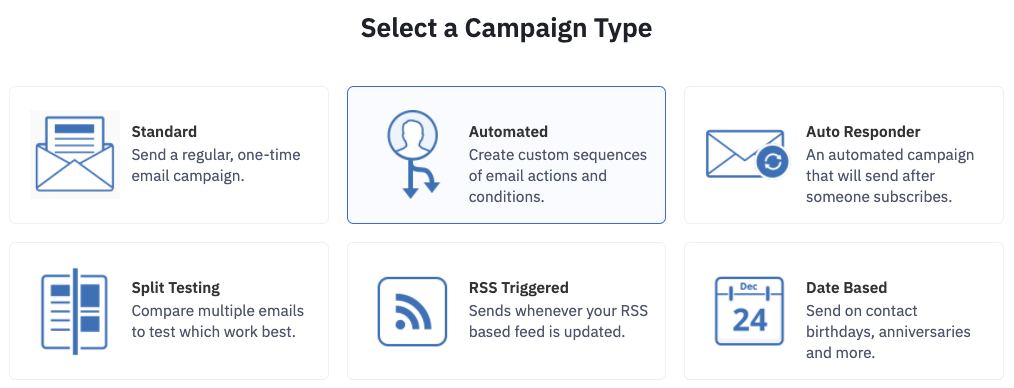
HubSpot has a relatively rich concept of a campaign. HubSpot provides examples of campaigns that can be run using its Campaign App.
Feature-laden Marketo offers Smart Campaign functionality. With a Smart Campaign, “the second someone does something,” a flow (series of steps) can be triggered.
CRM Campaign and Marketing Automation System Interaction
Because of differing definitions of “campaign,” when campaigns are paired with CRM and marketing automation systems, they do not synchronize bidirectionally, as many marketers may naturally expect.
Instead, a CRM campaign lead or contact can be added to a marketing automation segment or list via an import or a rule.
Depending on the level of integration, a marketing automation prospect or contact can be added to a CRM campaign via a rule, which is an explicit acknowledgment by marketing automation vendors that CRM campaigns are different animals.
Before adopting a marketing automation system and integrating it with a CRM, marketers should understand how the term “campaign” is defined across applications, so they can better prepare and execute essential marketing tasks.